Thursday, February 7, 2013


Minecraft: Running a Server on FreeBSD
I'd previously posted about running Minecraft on FreeBSD, but that was a year ago, and I didn't give many details about the server. (I haven't even tried to run the client on FreeBSD in a long time, both because I just leave my desktop to the memory-hogging server process and because I haven't been playing recently.) So here's my server setup.
Note: I'm running a custom build of FreeBSD 9.0 (I haven't gotten around to upgrading to 9.1 yet). Mostly I just removed drivers for hardware I don't have. Also, I created a separate user account for running the server. As I don't run around as root most of the time, I set up sudo to allow my regular user login the ability to run commands as the minecraft user. (I called mine "mc".)
The Server JAR File: I just use the plain jar from minecraft.net.
The Java Port: There are a bunch of JVM ports in the FreeBSD Ports tree. I tried them all. The one that has provided the most stability is openjdk7.
CraftBukkit: I am running a Craftbukkit server with about 10 plugins.
Screen: GNU Screen is very, very helpful here. It will let you run on the console and be able to connect to the running session from a remote login to see what's going on, without interrupting the minecraft server process. (In the FreeBSD ports tree, it's sysutils/screen. RTFM if you've never used it before; it's a little complicated at first, but becomes second nature with use.)
I start the initial screen session as follows (I name the session "stuff" for the backup script, below): screen -S stuff. Then I name the first shell (window 0) by pressing Ctrl-a A (control+a keys together, release, then capital 'A') so it will prompt me to rename that window. I name it "mc", again for the backup script.
The Startup Script: (I named it run.sh, but it doesn't matter.)
Run it in the directory in which you have the server jar file and the craftbukkit jar file. Note that if you're not using craftbukkit, you can replace the java command line with the one on the minecraft.net download page. Note also you need to update the craftbukkit jar file name as you upgrade, or you could name them all craftbukkit.jar and leave the script alone. (The first method takes a little more effort, but makes it easier to see what you're running.)
If you're running the server as another user, execute as sudo -u $MINECRAFT_USER ./run.sh
The Backup Script: (I got the basics from somewhere that I've forgotten, and altered it to my needs.)
You can then add a crontab to run it however often you want, but also make sure you add one to clean out old backup files, because they can eat up space fast. Make sure to change the directory names in the tar command, and make sure the target directory exists. Note that the screen ... 'printf ...' commands should actually get picked up by the server process. They pause disk writes so that you will get a clean backup.
Note: I'm running a custom build of FreeBSD 9.0 (I haven't gotten around to upgrading to 9.1 yet). Mostly I just removed drivers for hardware I don't have. Also, I created a separate user account for running the server. As I don't run around as root most of the time, I set up sudo to allow my regular user login the ability to run commands as the minecraft user. (I called mine "mc".)
The Server JAR File: I just use the plain jar from minecraft.net.
The Java Port: There are a bunch of JVM ports in the FreeBSD Ports tree. I tried them all. The one that has provided the most stability is openjdk7.
CraftBukkit: I am running a Craftbukkit server with about 10 plugins.
Screen: GNU Screen is very, very helpful here. It will let you run on the console and be able to connect to the running session from a remote login to see what's going on, without interrupting the minecraft server process. (In the FreeBSD ports tree, it's sysutils/screen. RTFM if you've never used it before; it's a little complicated at first, but becomes second nature with use.)
I start the initial screen session as follows (I name the session "stuff" for the backup script, below): screen -S stuff. Then I name the first shell (window 0) by pressing Ctrl-a A (control+a keys together, release, then capital 'A') so it will prompt me to rename that window. I name it "mc", again for the backup script.
The Startup Script: (I named it run.sh, but it doesn't matter.)
#!/bin/sh
umask 0002
export JAVA_HOME=/usr/local/openjdk7
java -Xincgc -Xms1G -Xmx2816M -jar craftbukkit-1.4.7-R1.0.jar
Run it in the directory in which you have the server jar file and the craftbukkit jar file. Note that if you're not using craftbukkit, you can replace the java command line with the one on the minecraft.net download page. Note also you need to update the craftbukkit jar file name as you upgrade, or you could name them all craftbukkit.jar and leave the script alone. (The first method takes a little more effort, but makes it easier to see what you're running.)
If you're running the server as another user, execute as sudo -u $MINECRAFT_USER ./run.sh
The Backup Script: (I got the basics from somewhere that I've forgotten, and altered it to my needs.)
#!/bin/sh

export PATH=/bin:/usr/bin:/usr/local/bin

echo "Forcing save-all"
screen -x -p mc -X stuff `printf "save-off\r"`
sleep 5
screen -x -p mc -X stuff `printf "save-all\r"`
sleep 15
tar czvf /home/mc/backups/server.`date +%Y%m%d%H%M%S`.tgz /home/mc/server
screen -x -p mc -X stuff `printf "save-on\r"`
echo "Backup complete!"
You can then add a crontab to run it however often you want, but also make sure you add one to clean out old backup files, because they can eat up space fast. Make sure to change the directory names in the tar command, and make sure the target directory exists. Note that the screen ... 'printf ...' commands should actually get picked up by the server process. They pause disk writes so that you will get a clean backup.
Wednesday, February 6, 2013
Knittin' Crap: Starfleet January Shore Leave Missions
Technically January is an "off" month in the Starfleet Fiber Arts Corp, but nonetheless, there were duties to perform, including the first month of a 12-month afghan challenge, with each month requiring blocks representing the Planète du Mois.
Sock pattern from DROPS
Crocheted Flower Garland from Japanese book "Lace Best Crochet Motifs 238"
| Starfleet Afghan Challenge, January Planet of the Month: Tellar Prime: Homeworld of the Tellarites. One of the Founding Members of the United Federation of Planets. This mountainous planet is located in a binary star system, and itself possesses two moons. The primary hobby of the Tellarites - arguing - is considered a sport. Fortunately, their homeworld possesses a hot, humid, oxygen-rich climate which (since it tends to make them cranky) allows visitors to participate fully in the planetary game. | The slanted ridges of these afghan squares represent the steep slopes of the mountains on Tellar Prime. The cat represents the camera hogs indigenous to the planet.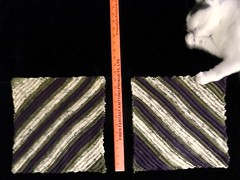 |
| Surprise Mini-Mission: Organize your stash or make something to decorate your space. | I am awaiting assignment to a new duty roster (as in, I’m between jobs at the moment), so I made this flower garland to decorate my new duty station when it gets assigned. |
| The Brig (for UFOs that turn into FOs) | Although I’ve been knitting for years, I only got around to making my first sock a year ago. It sat around, lonely, unpaired, acting out because no one understood it, for a year. Until today! Now it’s happy and can serve as a productive member of society with its partner. |
Sock pattern from DROPS
Crocheted Flower Garland from Japanese book "Lace Best Crochet Motifs 238"
Monday, February 4, 2013
Knittin' Crap: Xmas Roundup 2012
I actually finished distributing gifts before the end of January this time...
Baby Surprise Jacket pattern by Elizabeth Zimmermann
Wingspan pattern by maylin Tri'Coterie Designs
Sushi pattern by NeedleNoodles
10-Stitch Blanket pattern by Frankie Brown
| Who | What | Result... |
| Brad! |  | Just 2 puppets left to finish the original crew! |
| Baby Hank | 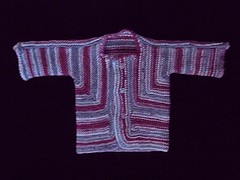 | Turns out Baby Hank is in the 90th percentile in size. The jacket fit for about 2 days. |
| Lily | 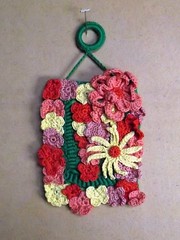 | Lily is a toddler, so since this didn't beep or blink or anything, I'm not sure it got much reaction... (See also Noelle.) |
| Mary | 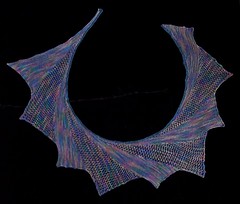 | Apparently at least one of her friends now hates her and me (whom she's never met) because my Wingspan doesn't look like the pattern, because I added the fagotting (yes, that's the proper term for the type of open lace I used) to add visual interest, and that's not how the pattern is written so she can't make one just like it herself! Or something. |
| Noelle | 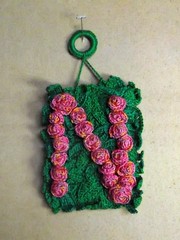 | I got a handwritten thank you note saying her daddy hung it up on her door the day after Christmas. |
| SteveZ |  | Awesome! |
| Dip & Spoon | 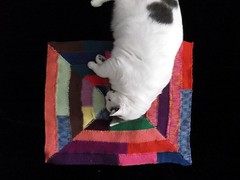 | I made it from leftover yarn from the afghan of mine they always try to steal and set it on the spot on the couch I want them to use instead! |
Baby Surprise Jacket pattern by Elizabeth Zimmermann
Wingspan pattern by maylin Tri'Coterie Designs
Sushi pattern by NeedleNoodles
10-Stitch Blanket pattern by Frankie Brown
Friday, February 1, 2013
Dear People Who Post Instructional Videos to YouTube
Dear People Who Post Instructional Videos to YouTube,
First of all, thank you for taking the time to try to share your knowledge. That's totally awesome. Now, on to the gripe.
Some of us have, like, no attention spans to listen to people talk, so if you could follow the journalistic creed of not burying your lead, or better yet, making condensed versions that just show us the meat, we'd be grateful. (If I want to learn a fairly straightforward, simple knitting stitch or method and the youtube video loads and says it's 5+ minutes long, I decide to find a written description instead, because that means someone is probably going to be fidgeting with their yarn while making some long-winded introduction for the first 3 minutes or so, and my mind will have totally wandered by the time they actually show the thing I want to learn, and I'll miss it, and I'll just have to go look it up anyway. By reading an explanation, even if there's a long-winded introduction, I can skim it, which is, yes, superior to trying to fast-forward a video, because my brain doesn't need a clumsy slider bar! (Ask me how well I managed the inscrutable expense reporting system at my last job, which was not only completely non-intuitive, but had no written manual, and used instructional videos for everything. A 7-minute video to tell me how to re-route a report that had been sent back to me? Seriously?))
Signed,
me
First of all, thank you for taking the time to try to share your knowledge. That's totally awesome. Now, on to the gripe.
Some of us have, like, no attention spans to listen to people talk, so if you could follow the journalistic creed of not burying your lead, or better yet, making condensed versions that just show us the meat, we'd be grateful. (If I want to learn a fairly straightforward, simple knitting stitch or method and the youtube video loads and says it's 5+ minutes long, I decide to find a written description instead, because that means someone is probably going to be fidgeting with their yarn while making some long-winded introduction for the first 3 minutes or so, and my mind will have totally wandered by the time they actually show the thing I want to learn, and I'll miss it, and I'll just have to go look it up anyway. By reading an explanation, even if there's a long-winded introduction, I can skim it, which is, yes, superior to trying to fast-forward a video, because my brain doesn't need a clumsy slider bar! (Ask me how well I managed the inscrutable expense reporting system at my last job, which was not only completely non-intuitive, but had no written manual, and used instructional videos for everything. A 7-minute video to tell me how to re-route a report that had been sent back to me? Seriously?))
Signed,
me
Subscribe to:
Posts (Atom)
Karen Blogs. See Karen Blog.



 Posts
All Comments
Posts
All Comments
