Showing posts with label minecraft. Show all posts

Sunday, June 28, 2015

Knittin' Crap: SFAC April 2015

Huh, I didn't get much done in May, because I was too busy changing, uh, assignments. Back on Earth. You know...
MissionReport
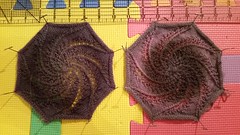
Diplomatic - Craft something representing language. Incorporate “words” with colorwork, cables, lace, texture, or repeating motifs.While humans generally expect written language to encode its meaning in different shapes, meaning can be encoded in other ways. I have fabricated an example where the shapes of the written symbols are identical, but the meanng comes from difference in color gradients. Such a subtlety may be lost to Doctor Chaotica and Captain Proton in their monochrome world, but for the cadets, it will force them to see meaning in ways they are not used to.
Swirls
The Brig - Releasing those lollygaggers who finally made good.This month I’m releasing two prisoners for the price of one:
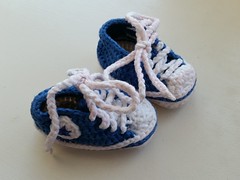
Chucks
Redstone Torch

Chucks pattern by Suzanne Resaul

Tuesday, April 30, 2013

News: Geeky Round-up


  • I'd save us! And I don't use the damn leading dash for the standard flags, so I can deal with almost any incarnation of tar, just in case the bomb runs on some 20-year-old UNIX version.


  • Minecraft builders complain about this, too. Updates are always breaking redstone circuits or minecart mechanics or monster grinders.

Friday, March 8, 2013

News: Random Fandom

Thursday, February 14, 2013

News: Video Game Bits


Bonus leftover Xmas lolcat:

Thursday, February 7, 2013

Minecraft: Running a Server on FreeBSD

I'd previously posted about running Minecraft on FreeBSD, but that was a year ago, and I didn't give many details about the server. (I haven't even tried to run the client on FreeBSD in a long time, both because I just leave my desktop to the memory-hogging server process and because I haven't been playing recently.) So here's my server setup.

Note: I'm running a custom build of FreeBSD 9.0 (I haven't gotten around to upgrading to 9.1 yet). Mostly I just removed drivers for hardware I don't have. Also, I created a separate user account for running the server. As I don't run around as root most of the time, I set up sudo to allow my regular user login the ability to run commands as the minecraft user. (I called mine "mc".)

The Server JAR File: I just use the plain jar from minecraft.net.

The Java Port: There are a bunch of JVM ports in the FreeBSD Ports tree. I tried them all. The one that has provided the most stability is openjdk7.

CraftBukkit: I am running a Craftbukkit server with about 10 plugins.

Screen: GNU Screen is very, very helpful here. It will let you run on the console and be able to connect to the running session from a remote login to see what's going on, without interrupting the minecraft server process. (In the FreeBSD ports tree, it's sysutils/screen. RTFM if you've never used it before; it's a little complicated at first, but becomes second nature with use.)

I start the initial screen session as follows (I name the session "stuff" for the backup script, below): screen -S stuff. Then I name the first shell (window 0) by pressing Ctrl-a A (control+a keys together, release, then capital 'A') so it will prompt me to rename that window. I name it "mc", again for the backup script.

The Startup Script: (I named it run.sh, but it doesn't matter.)

#!/bin/sh
umask 0002
export JAVA_HOME=/usr/local/openjdk7
java -Xincgc -Xms1G -Xmx2816M -jar craftbukkit-1.4.7-R1.0.jar

Run it in the directory in which you have the server jar file and the craftbukkit jar file. Note that if you're not using craftbukkit, you can replace the java command line with the one on the minecraft.net download page. Note also you need to update the craftbukkit jar file name as you upgrade, or you could name them all craftbukkit.jar and leave the script alone. (The first method takes a little more effort, but makes it easier to see what you're running.)

If you're running the server as another user, execute as sudo -u $MINECRAFT_USER ./run.sh

The Backup Script: (I got the basics from somewhere that I've forgotten, and altered it to my needs.)

#!/bin/sh

export PATH=/bin:/usr/bin:/usr/local/bin

echo "Forcing save-all"
screen -x -p mc -X stuff `printf "save-off\r"`
sleep 5
screen -x -p mc -X stuff `printf "save-all\r"`
sleep 15
tar czvf /home/mc/backups/server.`date +%Y%m%d%H%M%S`.tgz /home/mc/server
screen -x -p mc -X stuff `printf "save-on\r"`
echo "Backup complete!"

You can then add a crontab to run it however often you want, but also make sure you add one to clean out old backup files, because they can eat up space fast. Make sure to change the directory names in the tar command, and make sure the target directory exists. Note that the screen ... 'printf ...' commands should actually get picked up by the server process. They pause disk writes so that you will get a clean backup.
Sunday, January 13, 2013

Minecraft: Ahhh, Kids

Last night I got to ride back and forth to LAX with my friend's 5-year-old. Toward the end of the return trip, he started telling us (me and his mother) about how his brother (he has two, one who is named "Boney" and the other one whose name he doesn't know. He's an only child, by the way) cheats at Minecraft by buying a diamond pickaxe, and how that's cheating.

This was after he taught me a song called "Poop Your Head," which goes something like this:

Shake my booty
Shake my booty
Shake my booty
In your ass

Sunday, October 28, 2012

Knittin' Crap: October Missions

We finally managed to escape from that bothersome planet we were stranded on during the last Starfleet Fiber Arts Corp tour of duty. For this tour, the Command and Tactical division missions span all 3 months of the tour, while the other 4 divisions have monthly missions. In other news, I was promoted to Lt. Commander at the end of the last tour.
Division My report
Diplomatic: Follow Commander Sisko’s orders and craft something that shows your support or appreciation of the Klingons. Craft a cozy for their bloodwine, craft a sheath for their bat’leths or craft a favorite Klingon dish. Remember that Klingons are a warrior race; be bold and adventurous with this mission. I have constructed this device to aid in the making of gagh jerky. I know most Klingons love their gagh live, but that just isn’t practical for long missions, so jerky it will have to be.
Organized Circular Needles
Engineering: Help Chief O’Brien upgrade the warp drives of our ship. “Upgrade” a simple pattern by adding a cable, colorwork, lace, or a decorative edging, “upgrade” your skills by trying a new knitting or crochet technique, “upgrade” your library by knitting a newly published pattern (one published in the last 6 months) or “upgrade” your tools crafting something with a new kind of needles or hook. To aid in re-wiring the engines, I decided it would be easier to pre-wire the cabling, allowing us to lay the cabled mat in place and simply hook up the ends at the appropriate junctions. The mat is color-coded for ease of identifying which input goes where.
Squoosh
Medical: Craft something to help you reconnect with yourself and the world around you. Craft something you missed while stranded, something that makes you feel more connected to the world around you, or something that represents something or someone you love.I may have had my holo-kitties with me during our time stranded, but I did not have much quality time to spend with them. In honor of our renewed snuggle time, I made a mini-Spoon:
Spoon + Mini Spoon
Science: Analyze the samples that you collected. Craft something representing plant life, rock formations, or soil composition of the planet where we were stranded. For example, craft something that uses a botanical or geological pattern or craft a fossil.We had the misfortune to stumble across this odd creature. While it seems vegetative, it is also mobile (on four feet, although it seems to have no actual legs) and seems to have an intelligence of sorts. However, what makes it truly dangerous is that once it gets close enough to a humanoid, it will explode, taking the surrounding terrain with it and causing potentially severe injury. We only managed to capture this individual kamikaze bush by creating a stasis field.
Creeper Finger Puppet

Sunday, May 6, 2012

Knittin' Crap: Team Minecraft 2012!

Team Minecraft 2012 Yes, time is fast approaching for Ravelympics 2012, Ravelry's fiber-y answer to the Olympics. This year I've organized (to use the word loosely) Team Minecraft. We plan to dominate the events! Well, we plan to knit and crochet a lot, anyway.

Some of you may recall (but probably not), I managed to finish two sweaters for myself during Winter Ravelympics 2010. Of course, I was unemployed at the time. This year I have a somewhat challenging Japanese pattern picked out, but I need to swatch the yarn I have for it to make sure it will work. I'll be lucky to finish this time around. Of course, I do have a good bit of vacation time saved up...

Sunday, April 15, 2012

News: Cats, Cats, Cats, Cats, and... Cats

Thursday, March 29, 2012

Whiteboard Jungle: The REAL IT Crowd

We decided that if pawn brokers and parking valets can get their own reality shows, we should get one, too.

Shot 1: RL stares at screen and pounds on keyboard.
Shot 2: Coffee break.
Shot 3: I start cursing at the screen. "What the *bleep*!? You *bleep*ing piece of *bleep*! What were those *bleep*ing monkey *bleep*ers thinking?"
Shot 4: RL stares at screen and pounds on keyboard.
Shot 5: KK mocks my knitting, again. I silently plot revenge.
Shot 6: Coffee break.
Shot 7: Minecraft discussion on IRC.
Shot 8: JP calls someone a moron.
Shot 9: Me again. "*bleep* *bleep* *bleep*ity *bleep* *bleeeeeeeeeep*"
Shot 10: Meeting. Everyone's playing with their smartphone, except me, because I'm knitting.
Shot 11: Closing credits over RL staring at screen and pounding on keyboard.

Tuesday, February 28, 2012

Knittin' Crap: My First Month in the Starfleet Fiber Arts Corp

Even though I didn't think I'd make it, I actually did manage to complete all 6 missions in my first month in the Starfleet Fiber Arts Corp on Ravelry, although I didn't play much Minecraft. Barely any. I can count the hours on one hand. Well, maybe both hands.

Division and Mission Requirements My report
Culture: Research the entertainment throughout the history of Earth and craft something representative of it. Discombobulated Avian (see this post)
Command: Design a part of, or a new uniform. Craft something representative of it. Could be anything with the insignia on it or perhaps design your own medal or commendation in crafted form. As a Medusoid, I have hair with a mind of its own, always obscuring my eyes, getting in the way, and it also tries to steal my food before I can get it to my mouth. This headband will help control my hair and prevent my hair from impeding my duties.
Headband
Engineering: Make something that will help the engines work faster and more efficiently. Ensign Fuzzykaren from the USS Kitchener reporting in to Chief Engineer Scott.

In order to maximize engine efficiency, repairs and maintenance sometimes have to be performed in small spaces. We have remote-controlled robots to perform that maintenance, but the hands-on approach is sometimes preferable. To that aim, I made a mini-you, with the expertise to perform difficult repairs but the small size to get in any nook and cranny:
Scotty
Diplomatic: Create something Californian. It could be beachwear, something orangey, Hollywood-esque, etc. Create a good story and we’ll go with it! As has been noted, California is noted for its produce, particularly its citrus fruit, which grows well in the warmer areas of the state. This happy orange must certainly be from California:
Orange You Glad to See Me
Medical: Craft something to aid you in giving First Aid to someone in need. This device can serve multiple functions. Among other uses, it can warm the shoulders and neck in cases of hypothermia, and the soothing color changes have been shown to calm most sentient species in times of distress.
Wingspan
Security: Make something to help you stay/get in shape!I have completed my Security mission in the form of this supply carry sack. I plan to increase my physical activity by carrying as many supplies as I can instead of simply transporting them to their final location.
Grocery Sack

Note that going in, I decided I wouldn't make anything that I didn't already have on my to-do list or that I had absolutely no use for or didn't really want, and I've stuck to it!

Monday, January 23, 2012

Minecraft: Best Doorbell Ever


Now they just need to let us pimp our minecarts.

Tuesday, January 17, 2012

Minecraft: FreeBSD

I've been running a Minecraft SMP server on FreeBSD for the better part of a year now, initially on FreeBSD 8.2 and, for the past several weeks, on a custom build of FreeBSD 9-RC3 (named 9-FUZZYKERNEL), with only two process crashes. Getting the Minecraft client to run consistently on FreeBSD can be another story, though.

Now, Java on FreeBSD is a wonky thing. It was never officially supported by Sun and/or Oracle. There are two native ports, but neither works 100% of the time, and the official Linux JDK/JRE can be run in compat mode, but it's also problematic. Now, I seem to recall that when I started playing well over a year ago, I could play on my old FreeBSD 8.x desktop, even though it was graphically unpleasant, but I could be wrong. The client now won't work with either the diablo-jdk1.6, diablo-jre1.6, or jdk1.6 Java ports. The launcher will start, but after logging in, the window shows the error "Failed to launch / Fatal error occurred (2): null" and nothing further happens. (Someone running PC-BSD 9 has the same issue, so it's not just me and not just vanilla FreeBSD.) I don't know enough about Java to know if that's a bug on the FreeBSD JDK1.6 end or on the Minecraft end, but either way, there's no game-playing joy.

Now, I don't really care, since I mostly play Minecraft on my linux craptop, but that academic curiosity kicked in. There's still the Linux JDK, which is a bigger pain in the ass to set up, but I finally got around to it, and it seems to work.1

How to Run the Minecraft Client on FreeBSD

(This should also work on PC-BSD 9, although (a) I haven't tested it, but (b) you will need to take additional steps to set up the traditional FreeBSD ports tree.)

  1. Install the following ports. (Make sure you /usr/ports tree is up to date! You've run cvsup with a good ports config, right!?2) I'm hardcore and eschew installing the pre-compiled packages in general, but since Sun's Java has specific licensing terms, you can't install it as a package anyway, so just bite the bullet, set up the ports tree, and have at it.
    • linux_base-f10
    • linux-f10-dri -- May be optional in some environments, I'm not sure, but install it if you get libGL not found errors
    • linux-sun-jdk1.6.0
  2. Make sure the linux kernel module is loaded. As root: "kldload linux"
  3. Make sure the linux proc filesystem is mounted. As root: "mount -t linprocfs linprocfs /compat/linux/proc"
  4. Since you need to set up a couple environmental variables that you won't normally want set, I suggest making a dinky startup script:
    $ cat runmc
    #!/bin/sh
    export JAVA_HOME=/usr/local/linux-sun-jdk1.6.0
    export LD_LIBRARY_PATH=/compat/linux/lib:/compat/linux/usr/lib:/usr/local/linux-sun-jdk1.6.0/jre/lib/i386
    java -cp minecraft.jar net.minecraft.LauncherFrame
  5. Get the Linux minecraft client jar file from minecraft.net and then have at it.
P.S. The game does seem to crash whenever I quit (at least the timing is convenient), but it freezes instead of dying. It likes to leave around a lot of java processes, too, so you may want to check and kill them as necessary.


1When I tried to run the client on my FreeBSD 9 desk top, which I had logged into over ssh with X11 forwarding on from my linux laptop, the client started, but after I logged in (the point where it starts the game launcher), I'd get the error "org.lwjgl.LWJGLException: Could not choose GLX13 config" However, if I try to play Minecraft on the FreeBSD box's local display, it works, and since I can also run Minecraft locally on the linux craptop, I assume it's some issue with X11 forwarding. Since I don't plan on playing remotely normally, it's not an issue for me.
2This is the ports-supfile I use, sans comments:
*default host=cvsup6.FreeBSD.org
*default base=/var/db
*default prefix=/usr
*default release=cvs tag=.
*default delete use-rel-suffix
*default compress
ports-all

Sunday, December 11, 2011

Minecraft: Perler Bead Sheep

Sheep
I've posted the charts for my perler bead sheep pattern.

Saturday, November 26, 2011

Minecraft: The Spoon Biome

After a few prototypes, I finally have a 3-D perler bead sheep that is pretty accurate to the proportions and is structurally stable.

The Spoon Biome

I'm not sure why Spoon is so worried. Maybe he's afraid he's going to morph from chunky into blocky.

Friday, November 25, 2011

Minecraft: Kids React

These are cute and funny.


I <3 Morgan. "Oh my god! How did you make the farting cat?" She's a major drama queen, but the bit in the second video where she's wondering if she'll need to build a roof to her shelter... that's how a Minecrafter thinks :)

Sunday, November 20, 2011

Minecraft: MineCon!

Minecrafter with pig
One of the myriad munchkins in attendance at the only event where wearing a cardboard box on one's head makes sense.
I just arrived back from MineCon in Vegas!

I will admit, I didn't go to many of the special events. Relaxing/recovering from work was primary, while waiting in lots of lines with a surprisingly large number of hyperactive adolescents was not high on my list of priorities.

And there were a lot of kids, although overall the attendee demographics definitely favored males in their teens and 20s. Geeky males. Most of the women my age were accompanying an adolescent son (although that doesn't mean the mother doesn't play, too; the game apparently has a large family fan-base.)

IMAG0296
There I was, minding my own business, when I suddenly heard a SSssssss sound coming from right behind me!
MineCon marks the full release of Minecraft 1.0.0. After Notch pulled the lever and zillions of kids raced to... where, exactly? I strolled up to my room and met all kinds of glorious creatures like Magma Cubes and Blazes and... yeah, that was about it. I'm too wimpy to visit The End yet.

I also partook of some other typical Vegas pursuits, although in relative moderation: some slots, the buffet, Bloody Marys for brunch... The last night, I was at the sushi bar in Mandalay Bay, having a discussion with the man sitting next to me. He said that there were about 5000 people around attending a conference for a video game. I said I was one of them. He seemed grateful that there was an adult there who could try to explain the game and its appeal with a vocabulary that consisted of more than Star Trek references spliced together with "like." (I can apparently "pass" for "normal" if I'm careful.) Another group of adults had stopped me earlier, seeing my badge, and asked me the same thing.

Me @Minecon
Me knitting at the Curse Minecraft Forums photo booth!


Anyway, it was a nice trip, a generally pleasant crowd. Mandalay Bay was an interesting place to stay, as I had never done the big resort thing before.

Monday, November 7, 2011

Minecraft: Young Frankencreeper

Friday, November 4, 2011

Minecraft: Look Behind You, Dip!

Rude Awakening in  3... 2... 1...

Thursday, November 3, 2011

Minecraft: Perler Bead Madness!

I have a new craft addiction: perler beads.

I missed perler bead fun when I was a kid, but when I saw these instructions for making a 3-D perler bead creeper, I had to try. I finished one today!

Dipity Hears a SSssssss Sound...

And because I have a bunch of other colors since I bought one of those buckets, I'm figuring out how to make a Minecraft sheep:

Sheep's Head

Labels!